

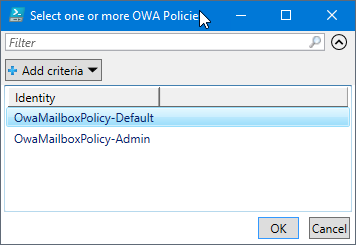
The script below will block users in a specified OWA Policy from creating Office 365 groups. The script uses Out-GridView to allow you to select which OWA Policy you want to assign this rule to.
#Office 365 Credentials
$username = "USERNAME"
$password = "PASSWORD"

try {
    #Attempts to connect to Office 365 and install Modules
    Import-Module MSOnline
    $pass = convertto-securestring -String "$password" -AsPlainText -Force
    $credential = new-object -typename System.Management.Automation.PSCredential -argumentlist $username, $pass
    Connect-MsolService -Credential $credential -ErrorAction Stop
    $ExchangeSession = New-PSSession -ConfigurationName Microsoft.Exchange -ConnectionUri "https://outlook.office365.com/powershell-liveid/" -Credential $credential -Authentication "Basic" -AllowRedirection
    Import-PSSession $ExchangeSession >null
}
catch [Microsoft.Online.Administration.Automation.MicrosoftOnlineException] {
    #Logs error for incorrect password
    Write-Host "Please verify your username and password"
    Write-EventLog -LogName Application -Source "Office 365 Log" -EntryType Error -EventId 1 -Message "OFFICE 365 AUTOMATIC LICENSE ASSIGNMENT`n`nError Connecting to Office 365! Please verify your user name and password"
    exit
}

catch {
    #Log for any other error
    Write-Host "Error Connecting"
    Write-EventLog -LogName Application -Source "Office 365 Log" -EntryType Error -EventId 1 -Message "OFFICE 365 AUTOMATIC LICENSE ASSIGNMENT`n`nError Connecting to Office 365!"
    exit
}
$OWA = Get-OwaMailboxPolicy | Select Identity | Out-Gridview -Title "Select one or more OWA Policies" -PassThru | foreach { $_.Identity }
if($OWA.count -eq 0) {
    Write-Host "Please rerun the script and select an OWA Policy"
}
else {
    if($OWA.count -gt 1) {
        foreach($MultiOWA in $OWA) {
            Set-OwaMailboxPolicy -Identity $MultiOWA -GroupCreationEnabled $False
        }
    }
    else {
        Set-OwaMailboxPolicy -Identity $OWA -GroupCreationEnabled $False
    }
}